

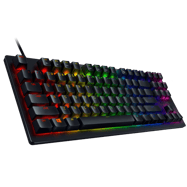
Razer Huntsman TE
2 pro players use this keyboard. Compare their configs in the Pro Player Settings hub or calculate your sensitivity with the eDPI Calculator.
About the Razer Huntsman TE
A gaming keyboard used by professional CS2 players. Modern competitive keyboards increasingly feature analog switches with rapid trigger technology, allowing near-instant key release detection for faster counter-strafing.
Why Pros Use It in CS2
In CS2, keyboard input directly affects movement mechanics. Rapid trigger keyboards have become dominant in the pro scene because they enable faster counter-strafing — the technique of instantly stopping to shoot accurately. Even without rapid trigger, a reliable keyboard with a comfortable layout is essential for consistent performance.
Teams Using the Razer Huntsman TE
2 teams have players using this keyboard.
All Players Using the Razer Huntsman TE


Settings Comparison Table
| Player | Team | Role | DPI | Sens | eDPI | Resolution | Aspect | Display | Refresh | Crosshair Code |
|---|---|---|---|---|---|---|---|---|---|---|
| 🇲🇳 dobu | ATOX Esports | Rifler | 400 | 2.15 | 860 | 1280x960 | 4:3 | Stretched | 1000Hz | N/A |
| 🇲🇪 Lobanjica | Unluko5 | Rifler | 800 | 1.7 | 1360 | 1280x960 | 4:3 | Stretched | 1000Hz | N/A |
Other Popular Keyboards
Frequently Asked Questions
How many CS2 pros use the Razer Huntsman TE?
2 professional CS2 players in our database currently use the Razer Huntsman TE. This makes it a notable keyboard choices among the competitive scene.
What settings do Razer Huntsman TE users prefer?
Pro players using the Razer Huntsman TE average 1110 eDPI (high sensitivity). Their settings vary by role and playstyle — check the comparison table below for full details.
Is the Razer Huntsman TE good for competitive CS2?
With 2 professional players using it, the Razer Huntsman TE is a proven choice at the highest level of CS2. Teams like ATOX Esports, Unluko5 have players using this keyboard. However, personal comfort and preference are the most important factors when choosing gear.